EMEET C60E 4K Webcam review time: this is not a plain plug-and-play webcam with one fixed view.
It is built for people who want wide framing, close-up detail, and real control over how they appear on camera.
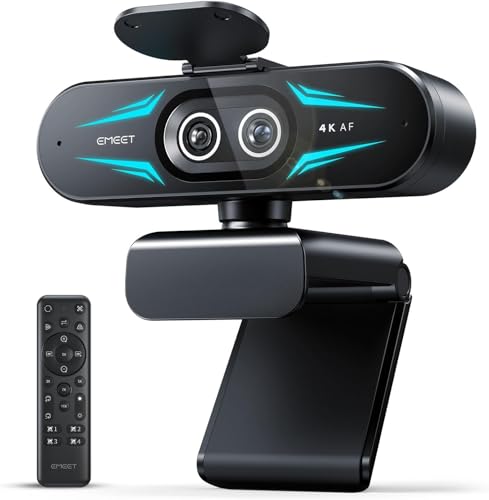
EMEET C60E Review Summary
If you need a webcam that can handle streaming, online meetings, and creator-style framing without forcing you into a single static shot, the EMEET C60E 4K Webcam makes a strong case for itself.
It is especially appealing for buyers who want one camera that can cover a full desk scene one moment and a tighter face or product shot the next.
What stands out most is the dual-camera concept.
Instead of relying on one lens and one perspective, the EMEET C60E 4K Webcam combines a wide-angle camera with a telephoto camera, so you can adapt the shot more naturally for work calls, livestreams, tutorials, and reaction content.
That flexibility is the main reason this model deserves attention over a basic 1080p webcam.
| Category | Score | Quick take |
|---|---|---|
| Video clarity | 9.0/10 | 4K CMOS design with sharp full-scene and close-up potential |
| Zoom flexibility | 9.0/10 | Hybrid zoom from 1X to 11X gives real framing control |
| Autofocus reliability | 8.0/10 | PDAF helps keep moving subjects clearer |
| Audio capture | 7.0/10 | Useful built-in mics, but not a replacement for a dedicated mic |
| Setup and compatibility | 8.0/10 | USB plug-and-play with broad OS support |
| Control and customization | 8.0/10 | Remote and software tools add convenience |
| Mounting and versatility | 8.0/10 | Compact body and tripod support help in flexible setups |
Bottom line: if your buyer profile includes Zoom meetings, OBS streaming, YouTube content, or desk-based product demos, the EMEET C60E 4K Webcam is a practical upgrade with better shot control than most mainstream webcams.
It is less ideal for buyers who need Windows Hello or flawless zoom support in every capture mode.
Key Features and Specifications of EMEET C60E
The EMEET C60E 4K Webcam is designed around a dual-camera layout and a 1/2.8-inch CMOS sensor.
That combination is the heart of the product, because it helps the webcam switch between broad framing and more detailed close-ups without feeling like a one-trick device.
| Spec | Detail |
|---|---|
| Brand | EMEET |
| Model/style | Dual-Camera w/ Remote |
| Sensor type | CMOS |
| Sensor size | 1/2.8-inch |
| Video resolution | 4K |
| Connectivity | USB 2.0 Type-A |
| Lens type | Wide Angle |
| Focus type | PDAF Auto Focus |
| Viewing angle | 73 degrees |
| Zoom | Up to 11X hybrid zoom |
| Microphones | Two omnidirectional microphones |
| Mic pickup radius | 9.8 feet stated range |
| Operating system support | Windows 10/11 64-bit, macOS 10.14+, Android TV 7.0+ |
| Video formats | YUY2 / MJPEG |
| Audio formats | AAC, PCM |
| Mounting | 1/4-inch tripod support |
| Color | Black |
| Notable limitation | Zoom not supported in 4K, 60FPS, or YUY2 modes |
| Compatibility note | Not compatible with Windows Hello |
For buyers comparing webcams for work and content creation, the most important details are the 4K sensor, hybrid zoom range, PDAF autofocus, and software-based controls.
Those are the features that influence daily usability more than the headline resolution alone.
- Dual-camera system: wide-angle and telephoto views in one unit
- Recommended telephoto distance: 13.8 inches for best close-up framing
- Hybrid zoom: 1X to 11X, with practical steps like 3X, 5X, 7X, and 11X
- Remote control: 22-key remote for quick adjustments
- EMEET STUDIO support: controls brightness, focus, zoom, and RGB lighting
- Compact design: easier to fit on desks and streaming rigs
Pros and Cons of EMEET C60E
Here is the EMEET C60E 4K Webcam pros and cons breakdown from a buyer’s perspective.
Pros
- Dual-camera framing is genuinely useful for switching between scene types.
- Hybrid zoom adds real versatility for creators who want tighter or wider shots.
- PDAF autofocus improves stability when you move or change distance.
- Two microphones are convenient for meetings and casual streaming.
- USB plug-and-play setup is straightforward on supported systems.
- Remote control and software tuning make on-the-fly changes easier.
- Tripod support expands placement options beyond a simple monitor mount.
Cons
- Zoom is not available in every mode, including 4K and 60FPS.
- Not suitable for Windows Hello users.
- No image stabilization, so a shaky mount can show up in the picture.
- Built-in audio is useful but not pro-grade for serious creators.
- Requires compatible operating systems for the best experience.
In plain terms, the EMEET C60E 4K Webcam is strong on flexibility, but buyers should not assume every feature works in every capture mode.
That tradeoff matters if you want to stream in 4K and zoom at the same time.
Who Should Buy EMEET C60E?
The EMEET C60E 4K Webcam is a good fit for people who need more than a standard laptop cam and want better framing options without stepping up to a full camera setup.
It suits remote workers, educators, streamers, and hobby creators who value convenience but still want control.
- Buy it if you host meetings and want a cleaner, more professional-looking on-camera presence.
- Buy it if you stream, record tutorials, or show products and need both wide and close views.
- Buy it if you like the idea of a remote and software controls instead of relying on fixed hardware.
- Buy it if you want easy setup on Windows or macOS with tripod flexibility.
On the other hand, you should skip the EMEET C60E 4K Webcam if you need Windows Hello, if your setup depends on zoom in 4K mode, or if you want integrated audio that can replace a proper external microphone.
Dual-Camera Wide-Angle vs Telephoto Use
This is the feature that separates the EMEET C60E 4K Webcam from a lot of mainstream options.
The wide-angle camera is the safer choice for meetings, groups, or desktop coverage because it captures more of the environment and makes the webcam easier to use in shared spaces.
The telephoto side is more interesting for creators.
It is aimed at closer framing, and the stated 13.8-inch viewing distance helps guide where your face, hands, or product should sit for better detail.
That is especially useful for unboxings, demo shots, or any setup where you do not want to look distant and tiny on screen.
The tradeoff is simple: wide mode gives context, telephoto mode gives focus.
Buyers who understand that split will get more value out of this webcam than buyers who only care about a fixed full-face shot.
Remote Control and EMEET STUDIO Workflow
The included 22-key remote control is one of the biggest usability wins here.
It makes it easier to adjust zoom or camera settings without reaching around your desk or interrupting a live session.
EMEET STUDIO adds another layer of control.
According to the product data, it supports adjustments for zoom, brightness, focus, and RGB lighting.
That matters if you like dialing in a more polished image before a call or stream.
For many buyers, this is where the EMEET C60E feels more like a creator tool than a basic office webcam.
Best use case: a fixed desk setup where you can keep the webcam positioned well and make small changes with the remote or software as needed.
Potential downside: if you want a completely hands-off camera that always looks good with no tweaking, this may be more feature-rich than you actually need.
Check current availability of the EMEET C60E 4K Webcam on Amazon
Streaming, Meetings, and Creator Use Cases
For live streaming, the EMEET C60E 4K Webcam makes sense because it can present a wider shot for commentary and a tighter shot for face-cam style output.
Creators who switch between talking-head content and desk demos will appreciate the flexibility.
For online meetings, it is stronger than a typical budget webcam because the image can look more intentional and less compressed when lighting is decent.
The built-in microphones help with convenience, though serious users will still prefer a separate mic or headset.
For teaching, tutorials, and product demonstrations, the dual-camera structure is the most compelling.
It lets you build a more dynamic presentation without immediately moving to a mirrorless camera, capture card, or multi-device setup.
Most buyer-friendly scenario: a creator or remote worker who wants one webcam to do multiple jobs well.
Mounting Options and Desk Setup Tips
The compact body and 1/4-inch tripod support are practical design choices.
They make the webcam more adaptable than models that are stuck in one clip-on position.
If you use it on a monitor, pay attention to height and angle.
Because the camera has no image stabilization, the shot will look better if the mount is secure and the desk is not vibrating from keyboard or arm movement.
If you use the telephoto mode often, positioning becomes even more important because the camera is looking at a narrower scene.
- Place the webcam at eye level for the most natural perspective.
- Use a tripod if your desk setup is crowded or your monitor sits too low.
- Keep the subject at the recommended telephoto distance when using close framing.
- Use good lighting so the 4K sensor can show its strengths.
Good setup discipline matters here.
The EMEET C60E rewards careful placement more than an average low-effort webcam does.
Image Quality Limits and Zoom Mode Notes
This is where buyers should read carefully.
The EMEET C60E 4K Webcam offers strong zoom flexibility, but zoom is not supported in 4K, 60FPS, or YUY2 modes.
That means you need to think about which capture mode matters most for your workflow.
If your priority is absolute 4K output, you may be less interested in zoom control.
If your priority is framing flexibility and live scene switching, the tradeoff is easier to accept.
That is why this webcam makes more sense for streamers and presenters than for buyers chasing a purely static 4K image.
The lack of Windows Hello support is another limit that matters for office-focused buyers.
If facial login is part of your daily routine, another webcam may fit better.
Comparable Alternatives to Consider
If you are comparing the EMEET C60E 4K Webcam with other Amazon-friendly options, a few familiar names make sense.
- Logitech Brio 4K webcam — a well-known choice for buyers who want a mainstream 4K webcam with a proven reputation.
- Razer Kiyo Pro webcam — a strong alternative for streamers who care about image performance and creator-focused features.
- AnkerWork webcam with autofocus — worth considering if you prefer a cleaner brand ecosystem and simple use.
- EMEET 1080P webcam — better if you want a simpler and likely more budget-friendly model from the same brand.
How the EMEET C60E compares: it stands out most when you want flexible framing and remote-based control.
If you only need straightforward video calls, the alternatives may be easier choices.
If you need a more adaptable camera for content creation, the EMEET C60E has the stronger feature story.
Is EMEET C60E Worth It?
Yes, for the right buyer, the EMEET C60E 4K Webcam is worth it. It is especially worthwhile if you want a webcam that can shift between wide and close framing, offers useful remote control, and provides more creative control than a standard office webcam.
The value case is strongest for streamers, remote presenters, and creators who will actually use the dual-camera layout, hybrid zoom, and software tuning.
If that sounds like your workflow, this is a smart and flexible purchase.
But the limitations are real.
Zoom restrictions in some modes, no Windows Hello support, and no image stabilization mean this is not the universal answer for every buyer.
It is a better fit for users who care about control and framing than for users who want the simplest possible webcam.
Final verdict: the EMEET C60E 4K Webcam is a solid creator-friendly webcam with above-average versatility, and it earns its place on shortlists for anyone shopping the EMEET C60E 4K Webcam review category.
If you want a webcam that does more than just sit on your monitor and stare into the room, this one is absolutely worth a close look.
Best for: streamers, remote workers, educators, and content creators who want flexible framing and easy control.
Skip it if: you need Windows Hello, always-on zoom in 4K, or professional-grade audio from the webcam alone.