The EMEET C950 4K Webcam review question is simple: does this compact USB camera deliver enough image quality and convenience for daily use?
For most buyers, it comes very close.
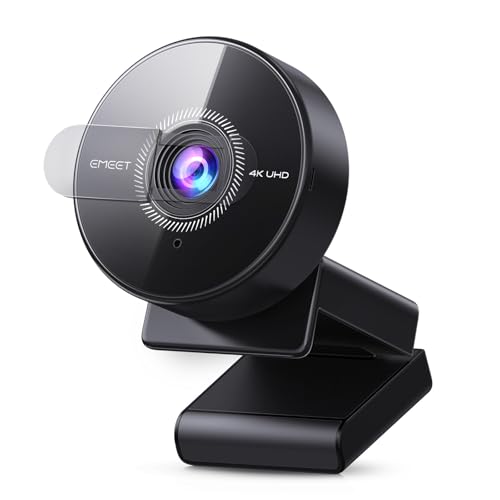
EMEET C950 Review Summary
If you want a straightforward webcam that combines 4K image capture, fast autofocus, and easy plug-and-play setup, the EMEET C950 4K Webcam makes a strong case.
It is especially appealing for remote workers, students, telehealth users, and casual streamers who want better-than-basic clarity without dealing with complicated software or extra accessories.
Scorecard
| Category | Score | What it means |
|---|---|---|
| Video clarity | 8.0/10 | 4K@30FPS and 1080P@60FPS with an 8MP CMOS sensor provide sharp detail in good lighting. |
| Autofocus performance | 8.0/10 | PDAF autofocus is faster and more stable than basic budget webcams. |
| Audio pickup | 7.0/10 | The built-in omnidirectional mic is fine for calls, but not a substitute for a dedicated mic. |
| Privacy and security | 9.0/10 | The physical privacy cover and no-Wi-Fi design are excellent for peace of mind. |
| Compatibility | 8.0/10 | Works with major meeting apps and common operating systems. |
| Ease of setup | 9.0/10 | USB 2.0 plug-and-play makes setup fast and simple. |
| Mounting and flexibility | 6.0/10 | Useful bracket adjustment, but no tripod hole limits placement options. |
In plain terms, the EMEET C950 4K Webcam is best for buyers who want a reliable everyday webcam rather than a creator-focused studio device.
Its biggest strengths are convenience, privacy, and consistently good image quality for meetings, while its main trade-offs are limited mounting flexibility and a mic that is merely adequate.
So, is EMEET C950 4K Webcam worth it?
If you mainly join video calls, teach online, attend telehealth appointments, or stream casually from a desk, it absolutely can be.
Key Features and Specifications of EMEET C950
| Specification | Details |
|---|---|
| Brand / Model | EMEET C950 |
| Camera type | 4K UHD webcam |
| Sensor | CMOS |
| Photo sensor size | 1/2.7-inch |
| Video resolution | 4K |
| Max frame rate | 4K@30FPS / 1080P@60FPS |
| Effective output | 8-megapixel |
| Autofocus | PDAF autofocus |
| Field of view | 70° |
| Microphone | Built-in omnidirectional microphone |
| Connectivity | USB 2.0 plug-and-play |
| Software | No driver required for basic setup; customizable via EMEETLINK |
| Privacy | Physical privacy cover |
| Compatibility | Zoom, Microsoft Teams, Google Meet, Cisco Webex, FaceTime, GoToMeeting, Lifesize, Slack, Line |
| Operating systems | Windows 10/11, macOS 10.14+, Android TV 7.0+ |
| Mounting | Flexible bracket with vertical tilt adjustment |
| Weight | 3.04 ounces |
| Dimensions | 1.9 x 1.9 x 1.5 inches |
| Color | Black |
| Special note | Not compatible with Windows Hello |
| Mounting limitation | No tripod hole |
The feature list tells you a lot about the design philosophy behind the EMEET C950 4K Webcam.
This is a no-fuss webcam built for practical video communication, not a gadget loaded with wireless functions, built-in lighting, or advanced studio controls.
That approach is often smart for buyers who just want to open a laptop, plug in a webcam, and start a meeting.
The USB 2.0 connection and no-driver setup remove friction, and the privacy cover is a meaningful value-add for anyone who regularly leaves a camera attached to a monitor.
Pros and Cons of EMEET C950
- Strong 4K-capable image output for meetings, classes, and light streaming.
- PDAF autofocus is a real advantage over basic fixed-focus or slow-focus webcams.
- Physical privacy cover adds confidence when the camera is not in use.
- USB plug-and-play setup keeps installation easy for beginners.
- Broad app and OS support helps it fit common home and office setups.
- Compact and lightweight design works well on laptops and monitors.
- No tripod hole, which limits alternative mounting options.
- 70° field of view is better for one person than for group calls or wide desk scenes.
- Built-in mic is serviceable, not exceptional, so serious creators may want an external microphone.
- Windows Hello is not supported, which matters for users who want facial login features.
- Performance still depends on lighting and app support, as with most webcams in this class.
Those EMEET C950 4K Webcam pros and cons point to a very specific kind of buyer: someone who values simple daily use and privacy more than advanced mounting or content-creator extras.
Who Should Buy EMEET C950?
The EMEET C950 4K Webcam is a smart buy for people who need a dependable camera for everyday communication and want better clarity than a basic 720p or average 1080p model.
It is well suited to remote workers, students, teachers, telemedicine users, and casual streamers who spend most of their time in a one-person frame.
- Buy it if you want sharp, easy-to-use video for Zoom, Teams, Google Meet, or similar apps.
- Buy it if you prefer a webcam with a physical privacy cover and no Wi-Fi dependency.
- Buy it if you want a compact camera that is easy to attach and easy to forget about until you need it.
- Skip it if you need tripod flexibility, wide-angle coverage for group calls, or a camera for professional content production.
- Skip it if you need Windows Hello support or want a fully integrated desktop-camera ecosystem.
From a buyer’s perspective, the EMEET C950 4K Webcam fits the sweet spot between affordability and practical quality.
It does not try to be a premium studio webcam, but it does cover the core needs of most office and home users very well.
EMEET C950 Webcam Image Quality in Real Use
Image quality is the main reason to consider the EMEET C950 4K Webcam.
The combination of a 1/2.7-inch CMOS sensor, 8-megapixel output, and 4K@30FPS support gives it more detail potential than typical entry-level webcams.
In a well-lit room, the image should look crisp enough for professional meetings, online teaching, and casual streaming.
The best part is that the camera is not only about resolution on paper.
The 1080P@60FPS mode can be especially useful if your app or computer handles smoother motion better than full 4K.
That matters for buyers who want a more natural presentation during speaking, gesturing, or screen-share transitions.
Still, the usual webcam rule applies: lighting matters a lot.
A 4K webcam cannot rescue a dark room on its own.
If you sit facing a window or use a decent lamp, the EMEET C950 should look noticeably more polished.
In a dim room, expect the image to soften and lose some of that 4K advantage.
The 70° field of view is another important design choice.
It keeps your face and upper torso framed naturally, which is ideal for one-on-one conversations and classes.
But if you want to show a wider desk area or fit more people into the frame, this narrower view may feel restrictive compared with broader webcams.
How the PDAF Autofocus Performs on a Desk Setup
One of the most practical strengths of the EMEET C950 4K Webcam is PDAF autofocus.
In everyday use, that should be quicker and steadier than the basic autofocus systems found on many budget webcams.
For buyers who lean in, shift in their chair, or move slightly while talking, that stability matters.
Desk setups are where autofocus quality becomes obvious.
A camera that hunts for focus during a meeting is frustrating, especially if you are presenting or teaching.
The EMEET C950 is positioned to reduce that problem, and that makes it more trustworthy for business calls than a cheap fixed-focus camera.
The practical focus range also suits standard monitor distances well.
If you keep the webcam mounted on a laptop screen or external monitor, the camera should have a relatively easy time staying locked on your face.
That is the kind of low-drama operation buyers want in an everyday webcam.
That said, autofocus is not magic.
Rapid movements, backlighting, and changing room conditions can still challenge it.
But compared with the typical webcam in this category, the EMEET C950’s focus system is a genuine selling point and a reason it stands out in the EMEET C950 4K Webcam review conversation.
Microphone Quality and Background Noise Handling
The built-in omnidirectional microphone is best viewed as a convenience feature rather than a headline audio tool.
For quick calls and small rooms, it should be enough to let others hear you clearly without plugging in extra hardware.
EMEET says the mic is suitable for communication up to about 6 feet, which matches the expectations of a webcam microphone in this category.
If you sit at a normal desk distance, it should be usable for meetings, classes, and basic livestream commentary.
However, buyers should keep expectations realistic.
Dedicated microphones still sound better, especially for creators, podcasters, or anyone working in a noisy environment.
The webcam mic will pick up voice and ambient sound, so if background noise is a concern, an external USB microphone or headset will be a better upgrade.
For buyers who simply want a clean all-in-one setup, the mic is good enough.
For buyers who care about broadcast-style audio, this is one of the clearest compromises in the EMEET C950 package.
Privacy Cover, USB Setup, and Everyday Convenience
This is where the EMEET C950 4K Webcam quietly earns a lot of trust.
The physical privacy cover is simple, effective, and reassuring.
If you leave your webcam mounted all day, that cover gives you a quick way to block the lens without unplugging anything.
The plug-and-play USB 2.0 setup is equally important.
Many buyers do not want to install drivers, manage Wi-Fi pairing, or troubleshoot proprietary software just to join a call.
With the EMEET C950, the basic experience is intentionally straightforward: connect it and use it.
That simplicity also makes it friendlier for mixed environments.
The camera supports major meeting platforms such as Zoom, Microsoft Teams, Google Meet, Cisco Webex, FaceTime, GoToMeeting, Lifesize, Slack, and Line.
It also works with Windows 10/11, macOS 10.14+, and Android TV 7.0+, which broadens its usefulness beyond a single laptop or desktop.
EMEETLINK customization adds some extra control for users who want to fine-tune image settings.
Even so, the camera remains a practical choice for buyers who prioritize reliable day-to-day convenience over advanced camera tinkering.
Best Uses for the EMEET C950 Webcam
The EMEET C950 4K Webcam is best in scenarios where a single user sits in front of a monitor and needs dependable framing, decent audio, and better-than-basic video quality.
That covers a lot of real-world use cases.
- Remote work meetings: Clear enough for regular professional calls.
- Online classes: Good for teachers and students who want a stable, readable image.
- Telehealth: The privacy cover and easy setup are especially practical here.
- Casual streaming: A solid option for beginners who are not ready for a full camera rig.
- Home office video chat: Simple, compact, and easy to keep mounted.
Where it is less convincing is in more demanding setups.
If you need a wide group frame, multi-person conference room coverage, or multiple mounting positions, the fixed 70° field of view and lack of tripod hole become more noticeable.
EMEET C950 4K Webcam Pros and Cons Compared with Alternatives
Compared with a typical 1080p autofocus webcam with a wider field of view, the EMEET C950 offers better headline resolution and a more privacy-conscious design, but the wider camera can be better for group calls or broader desk coverage.
If you want a premium conferencing upgrade, a Logitech Brio 4K webcam is the more established premium route.
That said, the C950 may be the better value-minded choice for buyers who do not need top-tier conferencing extras.
Buyers in darker rooms may prefer a webcam with built-in ring light.
That kind of model is often easier to use when natural light is poor, though it may add bulk and complexity.
And if flexible positioning matters, a webcam with tripod mount can be more practical than the C950.
The EMEET camera wins on simplicity, but it loses some placement freedom.
In other words, the EMEET C950 is not trying to beat every alternative on every axis.
It is trying to be the easiest competent webcam to live with, and that focus will appeal to many buyers.
Is EMEET C950 Worth It?
For the right buyer, yes, the EMEET C950 4K Webcam is worth it.
It offers a strong blend of 4K-capable video, PDAF autofocus, broad software compatibility, and a physical privacy cover, all in a compact USB form factor that is easy to use.
The value proposition is especially strong if you want a webcam for work, school, telehealth, or occasional streaming and you do not want to fight with setup.
The camera’s weaknesses are real, but they are understandable: limited mounting flexibility, a modest built-in microphone, and no Windows Hello support.
My buying advice is simple.
Choose the EMEET C950 4K Webcam if you want a practical, privacy-friendly webcam that looks better than basic models and works out of the box.
Skip it only if you need wide framing, advanced placement options, or creator-grade audio and lighting features.